
Introduction
If you’ve just subscribed to an IPTV service and you’re wondering how to get started, you’re in the right place. One of the most popular IPTV apps in 2026 is IPTV Smarters Pro — and the easiest way to set it up is by adding an M3U playlist.
In this step-by-step guide, we’ll show you exactly how to add an M3U playlist to IPTV Smarters Pro — no technical skills needed. Whether you’re using a Smart TV, Firestick, Android, or iPhone, this guide works for all devices.
What is an M3U Playlist?
Before we start, let’s quickly explain what an M3U playlist is.
An M3U playlist is simply a file or a URL that contains a list of TV channels, movies, and series from your IPTV provider. When you add an M3U playlist to IPTV Smarters Pro, the app loads all your channels automatically — ready to watch in seconds.
Your IPTV provider (like Nova IPTV) gives you this M3U URL after you subscribe. It usually looks something like this:
http://yourprovider.com:8080/get.php?username=XXXX&password=XXXX&type=m3u

What is IPTV Smarters Pro?
IPTV Smarters Pro is one of the best and most popular IPTV player apps available in 2026. It supports:
- ✅ Android smartphones & tablets
- ✅ iPhone & iPad
- ✅ Smart TV (Android TV)
- ✅ Amazon Firestick & Fire TV
- ✅ Windows PC & Mac
It’s free to download and super easy to use — making it the perfect app to add your M3U playlist and start watching IPTV.
How to Add an M3U Playlist to IPTV Smarters Pro — Step by Step
Step 1: Download IPTV Smarters Pro
First, download the app on your device:
- Android: Google Play Store → search “IPTV Smarters Pro”
- iPhone/iPad: App Store → search “IPTV Smarters Pro”
- Firestick: Amazon App Store → search “IPTV Smarters Pro”
Install the app and open it.
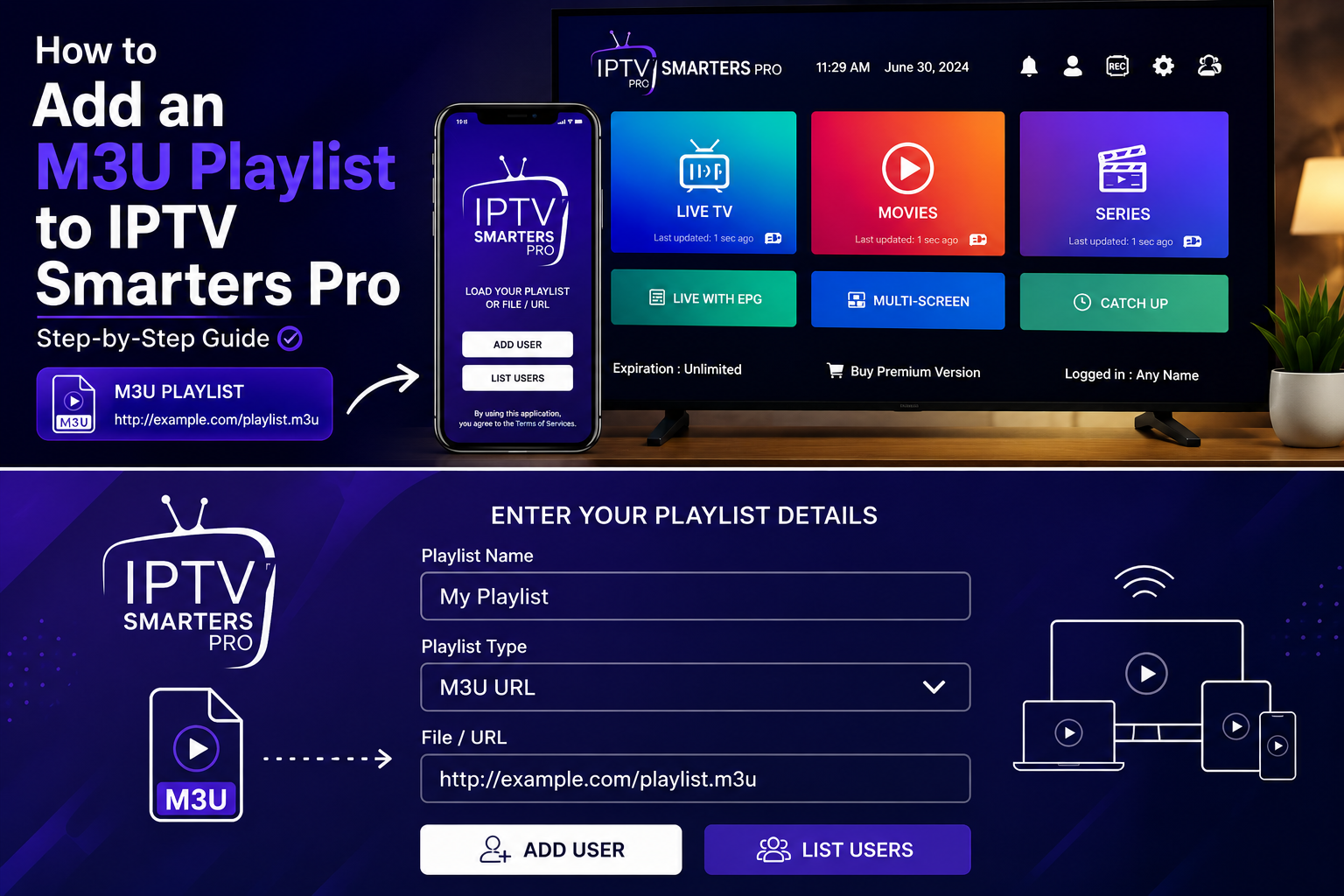
Step 2: Open the App and Click “Add User”
When you open IPTV Smarters Pro for the first time, you’ll see a welcome screen. Click on “Add User” or “Login with M3U URL” — depending on your app version.
Step 3: Choose “Load Your Playlist / Xtream Codes”
You’ll see two options:
- Load your Playlist or File/URL ←
- Login with Xtream Codes API
Select “Load your Playlist or File/URL” to add your M3U playlist.
Step 4: Enter Your M3U Playlist URL
Now fill in the following fields:
- Any Name: Write any name you want (example: Nova IPTV)
- Playlist URL: Paste your M3U URL that you received from your IPTV provider
Then click “Add User” or “Continue”.
Step 5: Wait for the Playlist to Load
IPTV Smarters Pro will now load your M3U playlist. Depending on the number of channels, this may take between 10 to 60 seconds.
Once loaded, you’ll see all your channels organized by category:
- 📺 Live TV
- 🎬 Movies
- 📺 Series
Step 6: Start Watching!
That’s it! You have successfully added your M3U playlist to IPTV Smarters Pro. 🎉
Browse your channels, pick your favorite show, and enjoy crystal clear HD streaming.
Tips for the Best IPTV Smarters Pro Experience
- ✅ Use a fast internet connection — minimum 10 Mbps for HD, 25 Mbps for 4K
- ✅ Use WiFi instead of mobile data for stable streaming
- ✅ Update the app regularly to avoid bugs and buffering
- ✅ Contact your IPTV provider if your M3U URL stops working
- ✅ Use a VPN if IPTV is restricted in your country
Troubleshooting — M3U Playlist Not Loading?
If your M3U playlist is not loading in IPTV Smarters Pro, try these fixes:
1. Check your M3U URL Make sure you copied the full URL correctly — no missing characters.
2. Check your internet connection A slow or unstable connection can prevent the playlist from loading.
3. Clear the app cache Go to Settings → Apps → IPTV Smarters Pro → Clear Cache.
4. Reinstall the app Sometimes a fresh install fixes all problems.
5. Contact your IPTV provider Your M3U URL might have expired or changed. Contact support to get a new one.
Why Choose Nova IPTV for Your M3U Playlist?
If you’re looking for a reliable IPTV provider to get your M3U playlist from, Nova IPTV is the perfect choice in 2026.
With Nova IPTV you get:
- ✅ Instant M3U URL after subscription
- ✅ 10,000+ channels including Croatian channels
- ✅ Full HD & 4K streaming quality
- ✅ 99.9% uptime — no buffering
- ✅ 24/7 customer support
- ✅ Compatible with IPTV Smarters Pro and all major apps
👉 Visit nova-iptv.net and subscribe today!
Conclusion
Adding an M3U playlist to IPTV Smarters Pro is quick and easy — it takes less than 2 minutes by following the steps above.
Whether you’re a beginner or an experienced IPTV user, IPTV Smarters Pro combined with a reliable provider like Nova IPTV gives you the ultimate TV streaming experience in 2026.
Ready to get started? Visit nova-iptv.net and get your M3U playlist today! 📺🚀